Made this yesterday. It's a collection of random footage edited together to match an untitled track, composed by Pablo. Watch away —
I'm off to watch The Dark Knight in a couple of hours. And if you haven't seen the Watchmen trailer yet, you should — it's simply amazing! If you didn't think it was amazing, you probably haven't read the book.
Sunday, July 20, 2008


Thursday, July 03, 2008
Browser Password Managers - Safe?
When Firefox (or any other browser for that matter) prompts you to remember passwords, do you say 'Yes'? I used to, until yesterday, when I discovered how surprisingly easy it is for someone to get his/her hands on them.
Assume that I want to grab the passwords that Person X has saved on his computer using Firefox. This is how I would go about it —
I would simply open up Firefox on his computer, go to Tools > Options > Saved Passwords > Show Passwords. Firefox shows so very neatly (in plain English), a window containing a list of sites along with the stored username and password for each of them.
Easy, no?
You'd think getting those passwords in such a scenario is difficult, but it isn't. All you need to know is the location of the files that contain all the username/password information and then write a simple program that mails those files to you as attachments.
First the location of the files. If you have Windows installed on C: drive, then you'll find all the important files at the following location —
C:\Documents and Settings\username\Application Data\Mozilla\Firefox\Profiles\Profile Folder
Open up the file called signons3.txt. You'll see a list of websites along with the username and password saved for each of them. However, you can't read it because it's in an encrypted format. To decrypt it, you'll need the private key — this is stored in the file key3.db. And the certificates (signed public keys) are stored in the file cert8.db. The MozillaZine page has more details about these files.
I wrote a small application that locates these files on a user's computer and sends them to me as email attachments. I tried out the application on Karthik's laptop and it worked like a charm! Once I got the files, I simply replaced my copies of the files with the ones I downloaded and voila! I could now log on to all the sites that Karthik had saved passwords for!
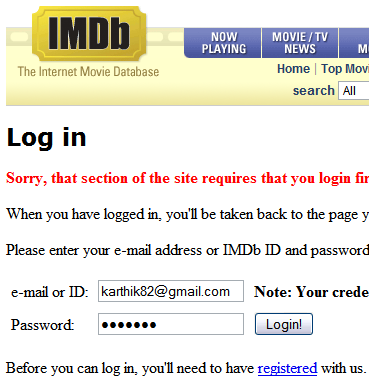
I wrote a harmless version of the same application for you guys to try out — download it here (5KB ZIP). It does everything except the emailing. If you don't trust me, you can always disable your internet connection before you run it.
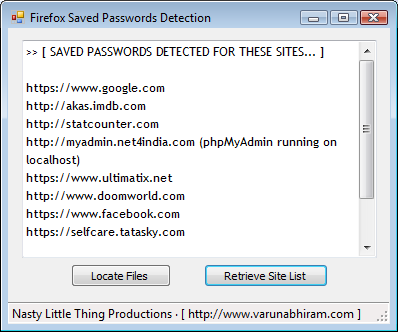
If you're saying "Whew! Thank God I use Internet Explorer and not Firefox!", you should know that a similar process can be employed to grab passwords from ANY browser that has the Remember Passwords feature.
Anyway, if you're interested in reading more about all this stuff, I suggest you have a look at this exhaustive two-part article on "Password Management Concerns with Firefox and IE" —
Part 1: http://www.securityfocus.com/infocus/1882
Part 2: http://www.securityfocus.com/infocus/1883
Assume that I want to grab the passwords that Person X has saved on his computer using Firefox. This is how I would go about it —
Scenario 1: I have access to his computer
I would simply open up Firefox on his computer, go to Tools > Options > Saved Passwords > Show Passwords. Firefox shows so very neatly (in plain English), a window containing a list of sites along with the stored username and password for each of them.
Easy, no?
Scenario 2: The computer is at a remote location
You'd think getting those passwords in such a scenario is difficult, but it isn't. All you need to know is the location of the files that contain all the username/password information and then write a simple program that mails those files to you as attachments.
First the location of the files. If you have Windows installed on C: drive, then you'll find all the important files at the following location —
C:\Documents and Settings\username\Application Data\Mozilla\Firefox\Profiles\Profile Folder
Open up the file called signons3.txt. You'll see a list of websites along with the username and password saved for each of them. However, you can't read it because it's in an encrypted format. To decrypt it, you'll need the private key — this is stored in the file key3.db. And the certificates (signed public keys) are stored in the file cert8.db. The MozillaZine page has more details about these files.
I wrote a small application that locates these files on a user's computer and sends them to me as email attachments. I tried out the application on Karthik's laptop and it worked like a charm! Once I got the files, I simply replaced my copies of the files with the ones I downloaded and voila! I could now log on to all the sites that Karthik had saved passwords for!
I wrote a harmless version of the same application for you guys to try out — download it here (5KB ZIP). It does everything except the emailing. If you don't trust me, you can always disable your internet connection before you run it.
If you're saying "Whew! Thank God I use Internet Explorer and not Firefox!", you should know that a similar process can be employed to grab passwords from ANY browser that has the Remember Passwords feature.
Anyway, if you're interested in reading more about all this stuff, I suggest you have a look at this exhaustive two-part article on "Password Management Concerns with Firefox and IE" —
Part 1: http://www.securityfocus.com/infocus/1882
Part 2: http://www.securityfocus.com/infocus/1883
Thursday, June 26, 2008
Palette, Sexy RPMs and 30,000+ Visitors
I had an online C Assessment Test at Wipro two days back, which went pretty well. There were 40 questions to be answered in one and a half hours. Most of the questions were the typical "What is the output of this program?" kinds that tests your understanding of the concepts and the quirks of the language, rather than your programming skills. So you probably wouldn't fare too well in the test if you thought the size of a structure containing two char members is 2 bytes or that int (*ptr)[3] was an array of integer pointers.
Anyway, with that test out of the way now, I will hopefully have a couple of weeks to myself until I officially start work.
Some days back I came up with this very crappy piece of art using Karthik's oil pastels. Now if I was as popular as Bob Dylan or Paul McCartney people would probably buy that for millions of dollars, but sadly I'm not.
I wanted to make something more presentable out of it, so I back-lit the drawing using two emergency lamps (to highlight the whites) and took photos of different sections of the drawing.

I finally selected two images I liked and overlayed them to get this final result —

Speaking of oil pastels, you should check out Karthik's latest drawing of The Incredible Hulk. It's damn good! The movie was good too, far better than the other movies I've seen at the theaters recently — Speed Racer, Indiana Jones and the Kingdom of the Crystal Skull and The Happening.
 In other news, I was trying to get my printer (it's a HP LaserJet 1020) to work on Fedora 8. Apart from installing foo2zjs, I had marked the HPLIP package for update, but for some reason Yum Extender marked all packages for which updates were available and began processing the queue. While the queue was being processed, a couple of packages caught my attention. Click the thumbnail on the left to see what I mean.
Amusing. I had no idea such packages existed.
Oh and by the way, this blog has now received over 30,000 unique visitors!
Anyway, with that test out of the way now, I will hopefully have a couple of weeks to myself until I officially start work.
Some days back I came up with this very crappy piece of art using Karthik's oil pastels. Now if I was as popular as Bob Dylan or Paul McCartney people would probably buy that for millions of dollars, but sadly I'm not.

I wanted to make something more presentable out of it, so I back-lit the drawing using two emergency lamps (to highlight the whites) and took photos of different sections of the drawing.
I finally selected two images I liked and overlayed them to get this final result —

Speaking of oil pastels, you should check out Karthik's latest drawing of The Incredible Hulk. It's damn good! The movie was good too, far better than the other movies I've seen at the theaters recently — Speed Racer, Indiana Jones and the Kingdom of the Crystal Skull and The Happening.
 In other news, I was trying to get my printer (it's a HP LaserJet 1020) to work on Fedora 8. Apart from installing foo2zjs, I had marked the HPLIP package for update, but for some reason Yum Extender marked all packages for which updates were available and began processing the queue. While the queue was being processed, a couple of packages caught my attention. Click the thumbnail on the left to see what I mean.
Amusing. I had no idea such packages existed.
Oh and by the way, this blog has now received over 30,000 unique visitors!
Sunday, June 08, 2008
Site Enhancements, New Wallpaper
Now that the Wallpaper a Day feature has ended, all the sections of VarunAbhiram.com are up-to-date! Thanks all for the views and comments.
Since there will be few updates to the site from now on, I figured it's a good idea to add a panel showing the recent comments posted on the site — that way the site won't look totally dead; assuming of course, that people take the time to comment now and then.
I've also noticed on StatCounter that the Traditional Art section receives no views at all. Probably because it's the only section of the site that's not directly accessible from the main navigation panel. The drawings aren't great, but I'd like all sections of the site to have equal visibility. So in order to facilitate that, I plan to display the Traditional and Digital art together on the Artwork page, and add a filter to allow you to look at the sections individually. This will take some time to implement, as I'll have to avoid duplication of images that belong in both categories (the Charlize Theron and Tom Cruise images, for example). The RSS code and some of the other pages would also have to be appropriately modified. And hopefully I won't introduce any bugs in the process.
Anyway, while I ponder over what has to be done, have a look at this new wallpaper I made yesterday called "Corrosion" —

Before I wind up this post, a couple of articles/links that might be worth your time —
Since there will be few updates to the site from now on, I figured it's a good idea to add a panel showing the recent comments posted on the site — that way the site won't look totally dead; assuming of course, that people take the time to comment now and then.
I've also noticed on StatCounter that the Traditional Art section receives no views at all. Probably because it's the only section of the site that's not directly accessible from the main navigation panel. The drawings aren't great, but I'd like all sections of the site to have equal visibility. So in order to facilitate that, I plan to display the Traditional and Digital art together on the Artwork page, and add a filter to allow you to look at the sections individually. This will take some time to implement, as I'll have to avoid duplication of images that belong in both categories (the Charlize Theron and Tom Cruise images, for example). The RSS code and some of the other pages would also have to be appropriately modified. And hopefully I won't introduce any bugs in the process.

Anyway, while I ponder over what has to be done, have a look at this new wallpaper I made yesterday called "Corrosion" —

Before I wind up this post, a couple of articles/links that might be worth your time —
- Seven innocent gestures that can get you killed Overseas
I'm not in the Middle East, so it's safe to give this article the Thumbs-up! - We don't have an Energy problem, we have a Storage problem
An interesting take on the rising oil prices issue. - Beautiful Black and White Photography
A collection of stunning black and white images. - Internal Windows Vista SP1 Promotional Video
I have absolutely no idea what they were thinking when they made this. And all these. - I Will Derive!
A parody of "I Will Survive" by Gloria Gaynor. Geeky fun.
Sunday, May 04, 2008
Wallpaper a Day

For the next 20 days, VarunAbhiram.com will feature a new wallpaper every day!
The wallpapers only get better with each update.
Tuesday, April 01, 2008
The Great Below
As promised in my previous post, here are those photos I took at the Hyderabad International Airport and the widescreen wallpapers I made from photos I took from the plane —
Rajiv Gandhi International Airport, Hyderabad


Wallpapers


And yeah, the video I posted of the airport isn't great, but it sure is popular!

Thursday, March 27, 2008
Rajiv Gandhi International Airport, Shamshabad
Karthik and myself were at Chennai last weekend, and our return flight landed at the newly opened Rajiv Gandhi International Airport at Shamshabad, Hyderabad.
I filmed a couple of clips on arrival at the airport, and yesterday I edited them together into this short video —
The background music is a track from NIN's latest album, Ghosts; I don't know if it really suits the video, but I couldn't find anything better to use. All clips were filmed with my digicam (hence the crappy video quality), between 2:30am - 3:00am. I also took some photos at the airport and made some wallpapers out images I took from the plane, but all that reserved for another post.
I filmed a couple of clips on arrival at the airport, and yesterday I edited them together into this short video —
The background music is a track from NIN's latest album, Ghosts; I don't know if it really suits the video, but I couldn't find anything better to use. All clips were filmed with my digicam (hence the crappy video quality), between 2:30am - 3:00am. I also took some photos at the airport and made some wallpapers out images I took from the plane, but all that reserved for another post.
Subscribe to:
Posts (Atom)